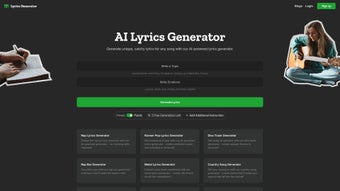

Download Lyrics Generator – AI‑Powered Songwriting Tool, Free Online Lyrics Creator
Lyrics Generator is a cutting‑edge, web‑based application that harnesses artificial intelligence to help songwriters, musicians, and lyric‑enthusiasts craft compelling verses in seconds. By analyzing millions of lyric patterns, rhyme schemes, and thematic structures, the platform can instantly produce verses that feel authentic while still offering room for personal flair. Whether you’re a seasoned composer looking for fresh inspiration or a hobbyist who struggles to find the right words, this tool delivers a solid creative springboard without the need for advanced writing skills. The interface is clean, the output is instantly downloadable, and the whole experience is designed to keep the creative flow uninterrupted. Below you’ll find an in‑depth review covering its core capabilities, setup process, platform compatibility, and the pros and cons that matter most to creative professionals.
In this review we’ll explore why Lyrics Generator has quickly become a go‑to resource for creators across genres, how its AI engine stays relevant with frequent model updates, and what you can expect when you start generating lyrics for free. By the end, you’ll have a clear picture of whether this AI‑driven assistant fits into your songwriting workflow and how to get the most out of its features.
What Is Lyrics Generator and Who Can Benefit?
At its core, Lyrics Generator is an AI‑driven lyric‑writing assistant that lives entirely in the browser. The service uses natural‑language processing models trained on a massive corpus of song lyrics across genres—from pop and hip‑hop to folk and metal. By feeding the AI a theme, mood, or a handful of seed words, users receive a full stanza or even an entire song structure that respects conventional rhyme patterns and melodic cadence. This instant feedback loop can dramatically shorten the brainstorming phase, allowing creators to move quickly from concept to demo.
Professional songwriters often face “writer’s block” after a few verses, and the pressure to deliver fresh content week after week can be overwhelming. Lyrics Generator offers a practical way to jump‑start that process, delivering ideas that can be tweaked, rearranged, or used as a foundation for original work. Indie artists producing music on a shoestring budget also find value in a free, web‑based tool that eliminates the need for costly co‑writing sessions.
Beyond musicians, the platform serves educators teaching songwriting, podcasters looking for catchy hooks, and marketers crafting jingles for campaigns. Its versatility stems from the ability to customize output by genre, emotional tone, or lyrical complexity, making it a truly universal creative companion. Whether you’re writing a pop anthem, a gritty rap verse, or a heartfelt ballad, the AI adapts its suggestions to match the stylistic expectations of each genre.
The tool’s no‑login entry point lowers the barrier for experimentation, while optional account creation unlocks history tracking, batch generation, and premium controls for power users. This flexible approach means hobbyists can dip a toe into AI‑assisted songwriting without commitment, whereas professional studios can integrate the service into larger production pipelines through the beta API.
Key Features That Make the AI Lyrics Generator Stand Out
- Theme‑Based Generation: Input a single word, phrase, or detailed description, and the AI builds lyrics that stay on‑topic, preserving the emotional core you define.
- Genre‑Specific Templates: Choose from pop, rock, rap, country, EDM, folk, metal, and more; each template respects typical rhyme schemes, syllable counts, and melodic phrasing for that style.
- Rhyme & Meter Control: Options to prioritize perfect rhymes, slant rhymes, or free verse, plus meter sliders for tighter rhythmic alignment with your music.
- Instant Preview & Editing: Generated verses appear in an editable text box, allowing on‑the‑fly tweaks before finalizing, with real‑time syllable counters.
- Export Options: Download lyrics as plain text, PDF, or copy directly to clipboard for seamless integration with DAWs, notation software, or publishing platforms.
- Multi‑Language Support: Early 2025 update added Spanish, French, and German lyric generation, expanding its global reach for multilingual projects.
- Secure, No‑Signup Access: Users can generate content without creating an account; optional sign‑up unlocks history storage, batch generation, and premium customizations.
- Regular Model Updates: The AI engine receives monthly updates that incorporate the latest chart‑topping trends, slang evolution, and lyrical innovations.
- Community Inspiration Feed: Browse anonymously shared lyric snippets for additional creative sparks, filtered by genre or mood.
- API Access (Beta): Developers can integrate the generator into their own apps via a simple RESTful endpoint, opening possibilities for custom workflow automation.
Each feature is designed with both speed and artistic integrity in mind. For example, the “Rhyme & Meter Control” lets you push the AI toward tighter lyrical structures when you need a chorus that fits a strict 4/4 pop rhythm, while the “Theme‑Based Generation” helps you stay focused on storytelling without wandering into unrelated topics. The combination of genre templates and multilingual capabilities also means you can experiment with cross‑cultural collaborations, drafting verses in Spanish and then translating them into English while retaining rhyme quality.
Getting Started: Installation, Compatibility, and How to Use the Tool
Because Lyrics Generator is fully web‑based, there is no traditional installation process. Users simply visit the official site, lyricsgenerator.ai, and begin crafting lyrics within seconds. The platform is optimized for modern browsers—Chrome, Firefox, Safari, and Edge—ensuring fast load times and responsive design on both desktop and mobile devices.
Step‑by‑step usage guide:
- Open the site: Navigate to the homepage and click “Start Generating.” No download or plugin is required.
- Select a genre: Choose from the dropdown menu (e.g., Pop, Hip‑Hop, Folk). Each genre presets rhyme density and syllable patterns.
- Enter your prompt: Type a theme, mood, or key phrase. For example, “lost love in a rainy city” or “celebration of new beginnings.”
- Adjust settings (optional): Toggle rhyme strictness, set verse length, or request a chorus vs. a verse.
- Generate: Click “Create Lyrics.” Within seconds, a stanza appears in the editor pane.
- Edit & refine: Use the built‑in text editor to modify wording, adjust line breaks, or swap synonyms.
- Export: Choose “Download PDF” to keep formatting, or simply copy the text for pasting into your DAW.
The tool also offers a “History” feature for signed‑in users, allowing you to revisit previous sessions and compare variations. For mobile users, the responsive layout ensures that the same workflow works on iOS Safari and Android Chrome without loss of functionality.
The application runs on any operating system that supports a modern web browser, including Windows 10/11, macOS Monterey and later, Linux distributions, iOS 13+, and Android 8+. Because all processing occurs in the cloud, device performance has minimal impact on generation speed.
Security is built‑in: all data transmission is encrypted via HTTPS, and any optional user data (such as saved history) is stored in compliance with GDPR standards. This means you can experiment freely without worrying about data leaks or unauthorized access.
Pros, Cons, Frequently Asked Questions, and Our Review
Pros
- Fast, on‑demand lyric creation saves hours of brainstorming.
- Free core version with no mandatory account creation.
- Genre‑specific templates ensure stylistic relevance.
- Responsive design works across Windows, macOS, Linux, iOS, and Android.
- Regular AI model updates keep the output fresh and contemporary.
- Export options (TXT, PDF, clipboard) fit any workflow.
- Multi‑language support opens doors for global collaborations.
- Secure, GDPR‑compliant data handling protects user privacy.
- Beta API enables integration with custom music‑production pipelines.
- Community feed provides endless inspiration from other creators.
Cons
- Advanced customization (e.g., specific meter patterns) requires a paid subscription.
- Generated lyrics sometimes need lyrical polishing to avoid clichés.
- No offline mode; an internet connection is mandatory.
- API access still in beta and may have usage limits.
- History storage is limited to 30 entries for free accounts.
- Occasional latency spikes during peak usage periods.
Frequently Asked Questions
Is Lyrics Generator really free?
The core lyric‑generation feature is completely free and does not require registration. Premium options such as unlimited history, advanced meter control, and API access are part of a paid subscription.
Can I use the generated lyrics commercially?
Yes. The output belongs to you, and you can incorporate it into commercial releases, provided you comply with the platform’s terms of service, which prohibit resale of the raw AI output as a standalone product.
What languages does the tool support?
Initially launched in English, Lyrics Generator now supports Spanish, French, and German. Additional languages are planned for 2026.
Do I need a powerful computer to run the generator?
No. Because all AI processing happens on remote servers, any device that can run a modern browser will work smoothly, even low‑end laptops or tablets.
How secure is my data when I use Lyrics Generator?
The site uses HTTPS encryption for all data transmission. Personal data (if you sign up) is stored in compliance with GDPR and is never shared with third parties without consent.
Can I integrate Lyrics Generator into my own music‑production software?
Yes. The beta API provides a RESTful endpoint that allows developers to send prompts and receive generated lyrics programmatically, enabling seamless integration with DAWs, lyric‑management tools, or custom web apps.
Our Verdict
Lyrics Generator delivers a fast, intuitive, and surprisingly accurate lyric‑writing experience that can dramatically improve a songwriter’s workflow. While the free tier provides ample functionality for most hobbyists, professionals may appreciate the optional premium features for deeper customization. The multi‑language support and genre‑specific templates make it a versatile companion for creators worldwide. Minor drawbacks such as occasional cliché phrasing and the need for an internet connection are outweighed by the sheer convenience and creative boost the tool offers.
Rating: 4.5/5
Final Verdict and Call to Action
If you’re looking for a reliable, AI‑driven partner that can jump‑start your songwriting, Lyrics Generator is one of the most polished solutions on the market today. Its blend of free accessibility, genre‑specific intelligence, and seamless web integration makes it suitable for both beginners and seasoned composers. The platform’s regular updates ensure that the lyrical suggestions stay current with musical trends, while the optional premium tier offers deeper control for those who need it.
Start by visiting the site, typing a simple prompt, and watching the AI craft a verse in seconds. Experiment with different genres, adjust the rhyme strictness, and use the built‑in editor to personalize the output. When you’re satisfied, export the lyrics as a PDF or copy them directly into your digital audio workstation for immediate recording.
Because the core service is free, there’s no risk in testing it out for your next project. If you find yourself relying on the tool daily, consider the paid subscription to unlock unlimited history, advanced meter controls, and higher‑volume API usage. Either way, Lyrics Generator can become an indispensable part of your creative toolkit, helping you turn a fleeting idea into a polished lyric faster than ever before.
Start generating your next hit today—the next lyric masterpiece could be just a click away.



.png)



